


Many Shopify merchants encounter the same frustrating situation: their store receives consistent traffic but generates very few sales.
If your Shopify store has traffic but no sales, the issue usually lies in ecommerce conversion issues within your customer journey, not your marketing reach.
This guide explains:
- Why Shopify stores get traffic but fail to convert
- The most common ecommerce conversion issues
- How to increase your Shopify conversion rate
- How AI marketing platforms like Akohub automatically identify and fix conversion problems
Why Your Shopify Store Gets Traffic but No Sales
Traffic simply means visitors are landing on your website. Conversion occurs when those visitors complete a purchase.
Many ecommerce stores see a mismatch between these metrics. According to Shopify’s ecommerce conversion benchmarks, the typical ecommerce conversion rate ranges between 1% and 3%, meaning most visitors will leave without buying unless the store is optimized for conversion.
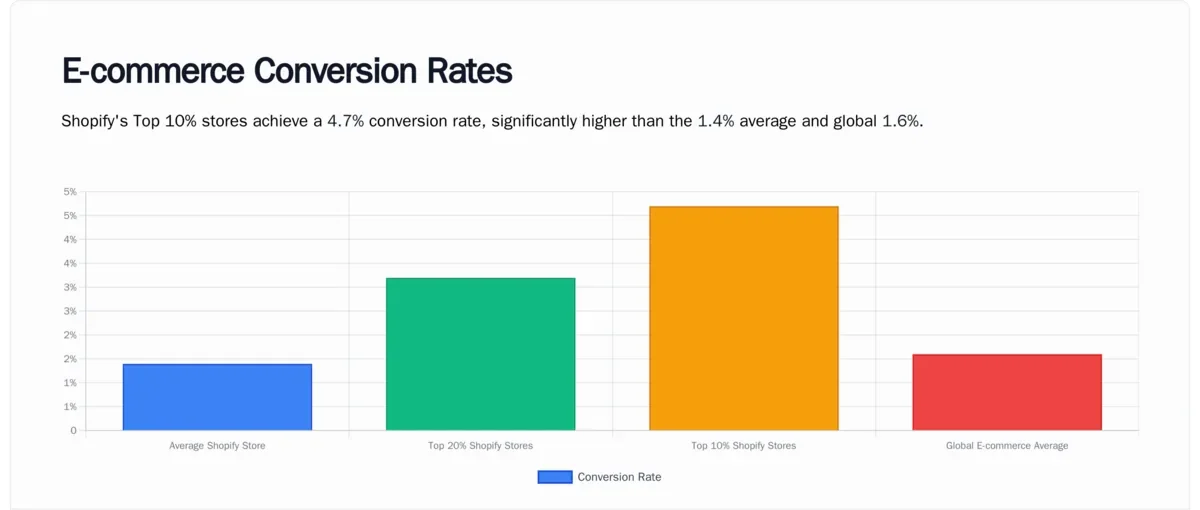
Source: Popusmart
When your Shopify store gets traffic but no sales, it typically indicates conversion friction somewhere in the shopping journey.
The Most Common Ecommerce Conversion Issues
1. Low-Intent or Poorly Targeted Traffic
Not all traffic leads to sales. Visitors who arrive through poorly targeted ads or broad keywords may not have purchase intent. If your store has high traffic but low engagement, it may indicate a traffic quality issue.
Research from Think with Google on consumer purchase behavior shows that shoppers often complete extensive research before buying, meaning traffic must align with high purchase intent. Improving traffic targeting can significantly improve your Shopify conversion rate.
2. Weak Product Page Experience
Product pages play the most critical role in ecommerce conversions. If your product pages lack clarity or persuasion, visitors will leave without purchasing.
Effective product pages typically include:
- High-quality images
- Detailed product descriptions
- Clear value propositions
- Social proof and reviews
According to HubSpot research on customer purchase behavior, customer reviews significantly increase buyer confidence and conversion rates. Adding social proof and strong messaging can dramatically improve product page performance.
3. Lack of Trust Signals
Trust is a major factor in ecommerce decision-making. Shoppers want reassurance before entering payment details. Important trust signals include customer reviews, security badges, transparent shipping policies, and easy returns.
Data from Statista’s global ecommerce research shows that trust and transparency strongly influence online purchase decisions. Stores that lack these signals often experience conversion drop-off before checkout.
4. Checkout Friction and Cart Abandonment
Checkout friction is one of the largest causes of lost revenue. According to research by the Baymard Institute on cart abandonment, the average ecommerce cart abandonment rate is nearly 70%.
Common checkout issues include forced account creation, complicated checkout steps, unexpected shipping costs, and limited payment methods. Reducing checkout friction is one of the fastest ways to increase your Shopify conversion rate.
5. Poor Mobile Shopping Experience
Mobile commerce now dominates ecommerce traffic. Data from Statista’s mobile ecommerce report shows that mobile devices account for a majority of ecommerce traffic globally. If your store is not optimized for mobile, visitors may leave before purchasing.

Source: Statista
Common mobile issues include: slow loading pages, hard-to-tap buttons, cluttered layouts, and poor checkout design. Optimizing mobile experience is essential for modern ecommerce stores.
How to Diagnose Shopify Conversion Problems
If your Shopify store has traffic but no sales, analyze where customers drop off in the funnel. Key metrics to monitor include your Shopify conversion rate, add-to-cart rate, checkout completion rate, bounce rate, and cart abandonment rate.
Understanding these signals allows you to fix the underlying ecommerce conversion issues, whether it's product page engagement, cart behavior, or checkout completion.
How Akohub AI Marketing Helps Increase Shopify Conversion Rate
AI marketing platforms like Akohub help merchants automatically detect and fix conversion issues.
👉 Install Akohub AI Retargeting & Loyalty for Shopify

AI Conversion Diagnostics
Akohub analyzes store performance to identify low converting product pages, traffic sources that do not generate sales, and checkout drop-off points. This helps merchants prioritize the most impactful improvements.
Automated Retargeting Campaigns
Akohub automatically launches marketing campaigns such as abandoned cart recovery, retargeting ads, personalized offers, and win-back campaigns. These campaigns recover lost revenue and increase conversion rates.
Loyalty and Retention Programs
Customer retention is essential for ecommerce growth. Akohub enables merchants to launch loyalty rewards, referral programs, and personalized promotions. These strategies increase repeat purchases and customer lifetime value.
FAQ: Shopify Traffic but No Sales
Why does my Shopify store get traffic but no sales?The most common reasons include weak product pages, low-intent traffic, checkout friction, lack of trust signals, and poor targeting.
What is a good Shopify conversion rate?The average Shopify conversion rate is typically between 1% and 3%, although highly optimized stores can reach 4% or higher.
Can AI marketing tools improve ecommerce conversion rates?Yes. AI marketing platforms analyze customer behavior and identify funnel drop-off points, personalize campaigns, and increase customer retention.
Final Thoughts
If your Shopify store gets traffic but no sales, the issue is rarely traffic itself. Instead, the problem lies in conversion optimization within your ecommerce experience. By improving product pages, simplifying checkout, building trust, and analyzing customer behavior, you can significantly increase your Shopify conversion rate.
Try Akohub for FREE today and start building your loyalty program today! Reach out to us at service@akohub.com or book a free consultation here:


