


The short answer: yes. If you're a Shopify merchant actively advertising on Meta (Facebook and Instagram), integrating Meta’s Conversions API, also known as Facebook’s Conversions API (CAPI), is essential for improving ad tracking, campaign accuracy, and overall return on ad spend. With growing limitations from browser cookies and iOS privacy updates, relying solely on the Facebook Pixel isn't enough.
That’s where server-side tracking through Facebook Conversions API comes in, and several Shopify-compatible tools make this integration seamless.
What Is Facebook’s Conversions API and Why It Matters
Meta’s Conversions API is a server-side solution that allows Shopify stores to send event data (such as purchases, add-to-carts, or page views) directly to Meta. It supplements or replaces browser-based pixel tracking, offering more reliable data even when browser tracking is blocked or restricted.
Benefits of using Facebook Conversions API:
-
Sends data from your Shopify store directly to Meta’s servers
-
Improves Event Match Quality (EMQ) for better ad delivery
-
Solves for data loss from ad blockers or iOS restrictions
-
Enhances attribution accuracy and reduces ad optimization delays
🔗 Facebook’s CAPI Overview
🔗 Facebook Help: Best Practices for CAPI

Why Shopify Merchants Need Meta CAPI Integration
Shopify merchants depend heavily on accurate data to track sales and measure ad ROI. Without proper server-side tracking, many conversions go unreported or misattributed, especially on mobile devices.
Challenges Shopify merchants face:
-
Missed conversions from Apple’s App Tracking Transparency (ATT)
-
Inaccurate ROAS reporting due to ad blockers
-
Reduced EMQ score leading to under-optimized ads
Shopify-compatible solutions solve this by:
-
Automatically integrating Shopify store data with Meta’s Conversions API
-
Offering visual dashboards to track data sharing performance
-
Improving reporting and campaign effectiveness
🔗 How to Track Meta Conversions on Shopify
🔗 Easy CAPI Setup Guide from EasyInsights
Top Tools That Connect Shopify with Meta’s Conversions API
1. Shopify’s Native Facebook & Instagram App by Meta
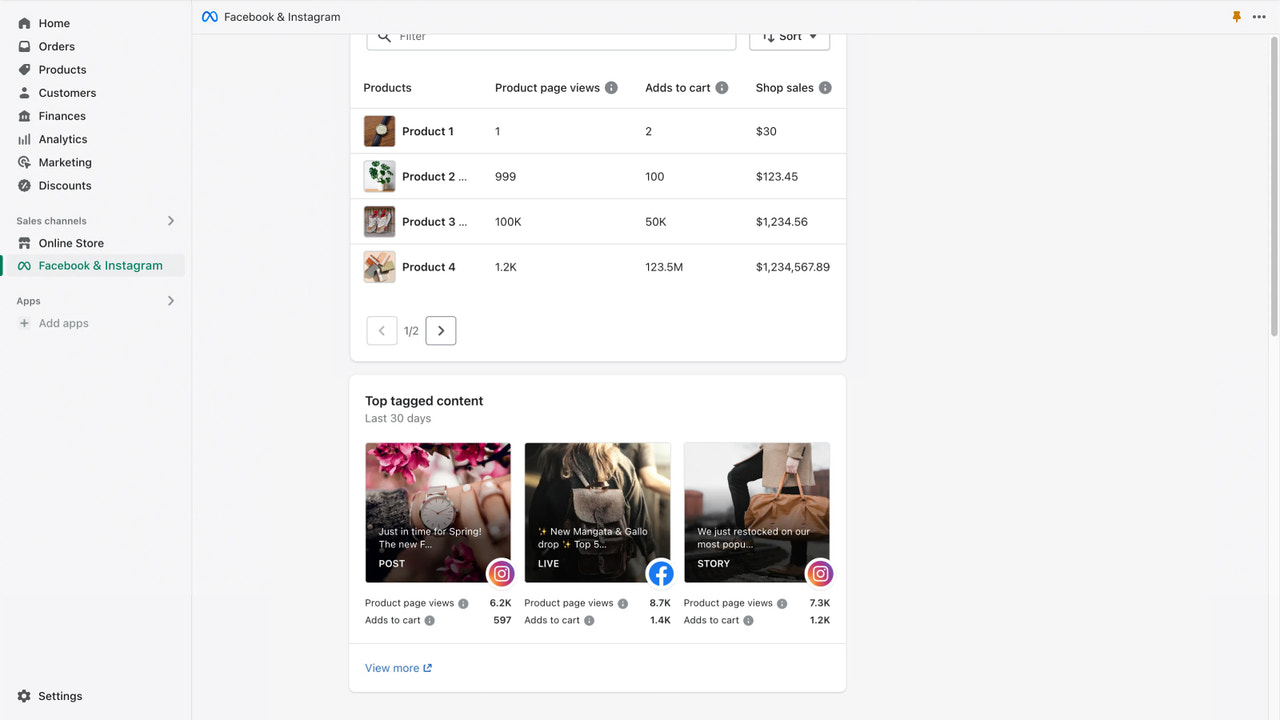
Shopify offers an official integration via its Facebook & Instagram sales channel, which now includes support for Conversions API.
Key features:
-
Built and maintained by Meta
-
Enables data sharing through Pixel + Conversions API
-
Offers multiple data sharing levels (Standard, Enhanced, Maximum)
-
No need for custom coding
Limitations:
-
Some users report partial data loss or delayed reporting
-
Limited EMQ optimization compared to advanced tools
🔗 Shopify Setup Guide
🔗 Meta Data Sharing in Shopify
2. Analyzify
Analyzify is a third-party Shopify app known for clean analytics integrations. It offers advanced Facebook CAPI implementation with Event Match Quality optimization. What it includes:
-
Full support for Facebook’s Conversions API
-
Accurate event deduplication across Pixel and server events
-
GA4, TikTok, and Google Ads integrations
Highlights:
-
Better control over tracking settings
-
Used by data-focused merchants
-
Requires a one-time setup fee

3. Akohub: AI-Powered Retargeting with Meta Integration
Akohub is a marketing Shopify app that connects your store’s data—customers, orders, products—with Meta’s Conversions API for smarter, automated retargeting.
Akohub stands out for:
-
Automatic product-level segmentation for Meta Ads
-
Weekly AI insights to improve ad targeting and ROAS
-
Native integration with Meta’s Pixel + Conversions API for paid campaigns
-
Comment-triggered DM automation for free organic retargeting on Instagram
Bonus features:
-
Loyalty rewards automation
-
Instagram engagement retargeting
-
1-click setup with free consultation included
Ideal for:
-
Shopify stores spending $500+/month on ads
-
DTC merchants needing accurate Meta tracking and smart automation
🔗 Akohub Shopify App
🔗 Akohub AI Insights Setup
🔗 Akohub Blog: Top Retargeting Apps

How to Set Up Facebook CAPI for Shopify (General Guide)
If you’re using Shopify’s native Meta integration:
-
Install the Facebook & Instagram Sales Channel
-
Connect your Meta Business Manager and Ad Account
-
Enable data sharing under Settings > Data Sharing
-
Choose “Maximum” for the best match quality
-
Verify your domain and check deduplication settings
Tools you may need:
-
Facebook Business Manager access
-
Shopify Plus (for advanced customization)
-
A compatible app like Akohub or Analyzify for more control
Troubleshooting Meta Conversions API Issues on Shopify
Common problems include:
-
Duplicate events from both Pixel and CAPI
-
Low Event Match Quality (EMQ) scores
-
Inconsistent data across platforms
Tips to resolve:
-
Check event deduplication settings inside Meta Events Manager
-
Use a tool that allows EMQ diagnostics (e.g., Analyzify or Akohub)
-
Regularly monitor data mismatch reports in Shopify and Meta
🔗 Shopify Community Discussion
🔗 Reddit Thread on Shopify + Meta Attribution
Advanced Strategies for Shopify + Facebook CAPI
If you’re running high-volume ads, consider:
-
Server-side only tracking: Reduce duplication and bypass browser issues
-
Custom events: Track unique business KPIs like loyalty tier upgrades
-
Multi-source data enrichment: Use CRM data + Shopify to send stronger customer signals
Akohub supports:
-
Custom product segmentation
-
Loyalty-triggered CAPI retargeting
-
Behavior-based re-engagement workflows
Data Privacy and Compliance
When sending customer data via Facebook’s Conversions API:
-
Always disclose data collection practices in your privacy policy
-
Use tools that offer GDPR/CCPA-compliant event tracking
-
Respect user consent preferences before data transmission
🔗 Shopify POS & Offline Attribution Guide
FAQs
Q: Can I use Facebook Conversions API on Shopify without coding?
A: Yes. Shopify’s native Meta integration and apps like Akohub allow no-code setup for most stores.
Q: What’s the difference between Pixel and Conversions API?
A: Pixel tracks browser-side events. CAPI sends events server-side for better accuracy, especially with iOS users and ad blockers.
Q: What’s the best Shopify marketing app with CAPI support?
A: Akohub is a top choice, offering Meta/Google retargeting, AI insights, and built-in CAPI integration.
Q: Do I need both Pixel and CAPI?
A: Yes, most Shopify merchants benefit from using both. Meta can deduplicate overlapping events for accuracy.
Q: What if my events aren’t showing in Events Manager?
A: Check your deduplication setup and verify that your event IDs are consistent across both Pixel and CAPI.
Final Takeaway: Maximize Ad Performance with Shopify + Meta CAPI
If you rely on Meta Ads to grow your Shopify store, integrating with Facebook’s Conversions API is no longer optional—it’s essential. It gives you cleaner data, better ad targeting, and a higher ROI on your marketing spend.
While Shopify’s native integration works, tools like Akohub offer more advanced segmentation, loyalty + retargeting automation, and real AI-powered insights. For merchants serious about optimizing Meta ad tracking, Akohub offers a complete solution that goes beyond the basics.


